
Introduction
Work has changed dramatically in recent years. People now manage emails, meetings, documents, research, social media, projects, deadlines, and repetitive administrative tasks across multiple platforms. This can make even a simple workday feel overwhelming. AI Productivity Tools are becoming an important solution because they can automate routine work, organize information, generate content, summarize documents, assist with research, and help people make better use of their time.
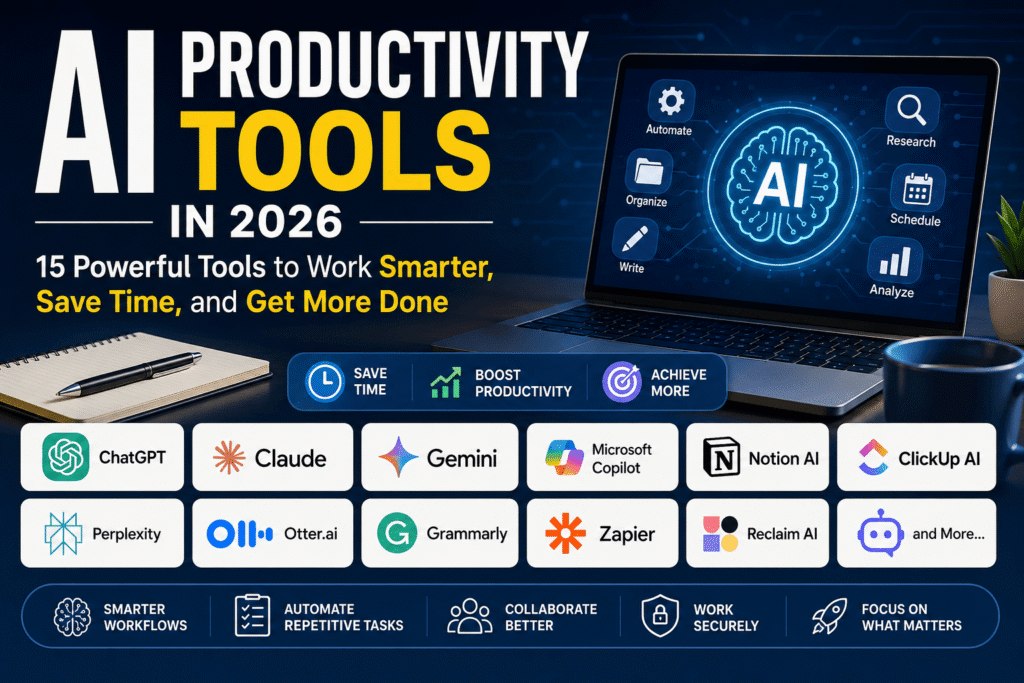
In 2026, the AI productivity market includes general-purpose assistants as well as specialized tools for writing, project management, scheduling, meetings, research, automation, and knowledge management. Current comparisons frequently highlight platforms such as ChatGPT, Claude, Gemini, Microsoft Copilot, ClickUp, Notion AI, Perplexity, Grammarly, Zapier, and other specialized applications.
The key is not to use as many applications as possible. The best approach is to identify where time is being wasted and choose technology that directly solves that problem.
What Are AI Productivity Tools?
AI productivity software uses artificial intelligence to help users complete everyday tasks faster or with less manual effort. Depending on the platform, it may understand natural-language instructions, analyze information, create text, summarize conversations, organize tasks, generate ideas, or connect different applications.
For example, a writer can use AI to create an initial outline, a student can summarize lengthy study material, and a business team can turn meeting discussions into organized action items. Automation platforms can go even further by connecting applications and triggering actions automatically.
Modern productivity software is therefore moving beyond simple chatbots. Many platforms are increasingly designed to work inside existing workflows and applications.
Best AI Productivity Tools in 2026
1. ChatGPT for General Productivity
ChatGPT is one of the most flexible options for everyday knowledge work. It can assist with writing, brainstorming, research, document analysis, coding, data-related tasks, planning, and many other activities.
Its biggest advantage is versatility. Instead of opening a different application for every small task, users can often start with one assistant and provide the necessary context.
For professionals, it can help create email drafts, organize ideas, summarize information, prepare reports, and develop content plans. Its broad range of capabilities makes it a strong starting point for people who want one general-purpose assistant.
2. Claude for Writing and Complex Work
Claude is particularly useful for people who regularly work with lengthy documents, detailed writing, analysis, and structured reasoning.
Writers can use it to improve drafts, organize complex information, and develop longer pieces of content. Developers and technical professionals can also use it for code-related work.
Its usefulness becomes greater when a task requires understanding substantial context rather than producing a short answer.
3. Google Gemini for Google Workspace
Google Gemini is a natural choice for people whose work already revolves around Google’s ecosystem. It can assist with workflows involving documents, email, meetings, research, and other Google services.
For organizations that rely heavily on Google Workspace, having AI capabilities integrated into familiar applications can reduce the need to move information between separate tools. Recent comparisons consistently identify Gemini as a strong option for Google-centered workflows.
4. Microsoft Copilot for Microsoft 365 Users
Microsoft Copilot is designed for people and organizations already using Microsoft products. Its greatest advantage is integration with Microsoft 365 workflows.
It can be particularly useful for professionals working with documents, spreadsheets, presentations, email, and business information. Microsoft-focused organizations may benefit more from an integrated assistant than from adding another standalone application.
5. Notion AI for Knowledge Management
Notion combines documents, notes, databases, project information, and team knowledge in one workspace. Its AI capabilities can help users summarize content, organize information, generate drafts, and work with existing knowledge.
It is especially useful for teams that already use Notion as their central workspace. Instead of keeping information in separate documents and applications, users can work with their existing knowledge in one environment.
6. ClickUp AI for Project Management
ClickUp is designed around tasks, projects, documents, collaboration, and reporting. Its AI capabilities can assist with project-related work while keeping information connected to the workspace.
For teams struggling with scattered project information, an integrated system can reduce unnecessary application switching. Current productivity comparisons describe ClickUp as a strong all-in-one option for teams that need tasks, documents, collaboration, and project management together.
7. Perplexity for Research
Research can consume hours when information must be collected from multiple sources. Perplexity is designed around AI-assisted search and research, making it useful when users need information along with supporting sources.
Students, marketers, researchers, and professionals can use it to explore unfamiliar subjects, compare information, and create an initial research foundation. However, important facts should still be checked against reliable primary sources before being used professionally.
8. Grammarly for Better Writing
Grammarly focuses on writing quality. It can help users identify grammatical problems, improve clarity, adjust tone, and polish professional communication.
It is particularly valuable for people who write emails, reports, proposals, marketing material, or other business content regularly. Rather than replacing the writer, it can function as an editing assistant.
9. Zapier for Workflow Automation
Zapier is useful when repetitive work involves moving information between applications. Instead of manually copying data from one service to another, users can create automated workflows.
For example, a new form submission could trigger a database update, notification, task creation, or follow-up process. Zapier’s AI capabilities are increasingly focused on making automation easier for people who do not have programming experience.
10. Reclaim AI for Calendar Management
Scheduling is another area where automation can save significant time. Reclaim AI focuses on intelligently organizing tasks, meetings, and focus periods around a user’s calendar.
This type of software can be useful for professionals whose schedules change frequently and who need help protecting focused work time.
AI Productivity Tools for Different Types of Users
For Students
Students can use AI for brainstorming, summarizing study material, creating revision questions, organizing assignments, improving writing, and researching unfamiliar topics.
However, AI should support learning rather than replace it. Students should verify information and understand the material themselves instead of submitting automatically generated work without review.
For Businesses
Businesses can use AI to automate repetitive processes, summarize meetings, create reports, support customer communication, organize knowledge, and assist employees with everyday tasks.
The biggest benefit often comes from integrating AI into existing workflows rather than simply adding another chatbot.
For Freelancers and Creators
Freelancers can use AI for client emails, proposals, research, content planning, brainstorming, administrative tasks, and project organization. Creators can also use specialized tools for writing, design, video, and marketing.
The result can be a more efficient workflow without requiring a large team.
How to Choose the Right AI Productivity Tool
Identify Your Biggest Time-Waster
Start by asking what consumes the most time. Is it writing, research, meetings, scheduling, project management, or repetitive data entry?
Choosing technology based on a specific problem is more effective than selecting an application simply because it is popular.
Check Integrations
Integration is extremely important. A powerful application becomes less useful if it cannot work with the software you already depend on.
For example, Microsoft-heavy organizations may benefit from Microsoft Copilot, while Google Workspace users may prefer Gemini.
Consider Privacy and Data Handling
Before entering confidential business information, review the provider’s privacy controls, data policies, account settings, and organizational requirements.
Sensitive customer information, financial records, passwords, private contracts, and confidential company data should never be shared casually with an AI service.
Avoid Using Too Many Tools
More software does not automatically mean greater productivity. Multiple applications can create additional notifications, subscriptions, duplicated features, and complicated workflows.
A practical strategy is to begin with one general assistant and add specialized applications only when they solve a genuine problem. This approach is also recommended by several recent productivity comparisons.
Benefits of AI Productivity Tools
The main advantages include faster content creation, reduced repetitive work, improved organization, easier research, quicker information processing, and better workflow automation.
They can also help individuals handle tasks that previously required significant manual effort. For small businesses and freelancers, this can be especially valuable because AI can provide assistance without requiring additional full-time staff for every routine task.
Limitations and Risks
AI is not perfect. It can produce incorrect information, misunderstand instructions, generate generic content, or make confident mistakes. Automated systems can also create problems when they are poorly configured.
Human judgment remains essential, especially for financial, legal, medical, business, and other high-impact decisions.
Another concern is over-automation. If every decision is delegated to software, users may lose visibility into how work is being completed. The best approach is to automate repetitive processes while keeping humans responsible for important decisions.
Future of AI Productivity Tools
The future is likely to move from simple question-and-answer systems toward AI assistants and agents capable of completing multi-step workflows.
Instead of asking an assistant to write a single email, a user may increasingly be able to provide a goal and allow the system to gather information, prepare a draft, update a task, and organize follow-up actions.
Recent industry comparisons already show this movement toward deeper integrations, workflow automation, and agent-style capabilities.
Frequently Asked Questions
Are AI Productivity Tools worth using?
Yes, when they solve a specific problem. They are most valuable when they reduce repetitive work or help users complete difficult tasks more efficiently.
What is the best AI productivity tool for beginners?
A general-purpose assistant such as ChatGPT, Claude, or Gemini is a good starting point because one application can support many different tasks.
Can AI tools replace employees?
They can automate certain repetitive activities, but they do not completely replace human judgment, creativity, communication, leadership, or specialized expertise.
Are free AI productivity tools available?
Yes. Many leading platforms offer free plans or limited free access, although advanced features, higher usage limits, and business capabilities may require paid subscriptions.
How many AI tools should I use?
There is no universal number. Start with one tool that solves your biggest productivity problem and add another only when there is a clear reason.
Conclusion
AI Productivity Tools are changing the way people write, research, organize information, manage projects, schedule their time, and automate repetitive work. In 2026, users have more choices than ever, ranging from general assistants such as ChatGPT, Claude, and Gemini to specialized platforms for project management, research, writing, meetings, and automation.
The smartest strategy is not to collect dozens of applications. Instead, identify your biggest workflow problem, choose a tool that fits your existing environment, protect sensitive information, and keep human judgment involved.
When used thoughtfully, AI can become more than a convenient chatbot. It can serve as a practical digital assistant that helps individuals and businesses spend less time on repetitive work and more time on meaningful, high-value tasks.